

Introduction: AI in HR in 2025 – The New Standard of Efficiency
Working with several dozen of the largest companies in the Polish market, I can confidently say that 2025 is the time when technology in HR has ceased to be merely an add-on – it has become a key tool for building competitive advantage.
Artificial intelligence (AI) is changing the way organizations manage talent, communicate with candidates, and optimize recruitment processes. HR departments and employers today face an enormous challenge: to act faster, more effectively, and more efficiently, while simultaneously ensuring excellent candidate experiences and efficient employee service.
Moreover, in conversations with HR departments and boards, I see a clear trend – they're betting on AI and doing everything to ensure their employees stay current with technology. They invest in training, implement modern tools, and build a pro-technology organizational culture, because they know it's the key to maintaining competitiveness.
In this context, tools such as Copilot in Outlook or integrations and error-free data transfer between systems are becoming invaluable allies for HR managers, business owners, and office teams. This is no longer the future – it's the present, redefining work standards in the area of people management.
HR Challenges without AI Support
Traditional HR communication, especially in large organizations or rapidly growing companies, is time-consuming and error-prone. Responding to dozens of messages from candidates, preparing summaries of recruitment conversations, or creating professional responses requires not only knowledge but also enormous attention to detail. Without AI support, typical problems emerge:
- Communication delays – long waiting times for responses lower candidate engagement and negatively impact the employer's image.
- Errors and inaccuracies – manual message editing increases the risk of typos, mistakes, or incomplete information.
- Uneven level of professionalism – different HR employees may construct messages differently, affecting employer brand consistency.
- Excessive bureaucracy – repetitive tasks, such as recruitment conversation summaries, take up time that could be devoted to strategic activities.
Copilot in Outlook helps HR departments
Copilot in Outlook is a tool that revolutionizes the daily work of HR teams. Thanks to AI integration, Copilot automates and streamlines key elements of communication, allowing HR specialists to focus on relationships and decisions rather than tedious administrative tasks.
1. Automation of writing messages to candidates
Copilot analyzes correspondence content, suggests professional responses, recommends additions, and ensures linguistic correctness and communication consistency. An example? An HR Manager receives a dozen or so similar inquiries about recruitment status. Copilot generates personalized responses, taking into account the candidate's name, process stage, and tone consistent with the employer brand.
Immediately after selecting the "Reply" option, a window appears where we can enter our own proposal or choose from ready-made suggestions:
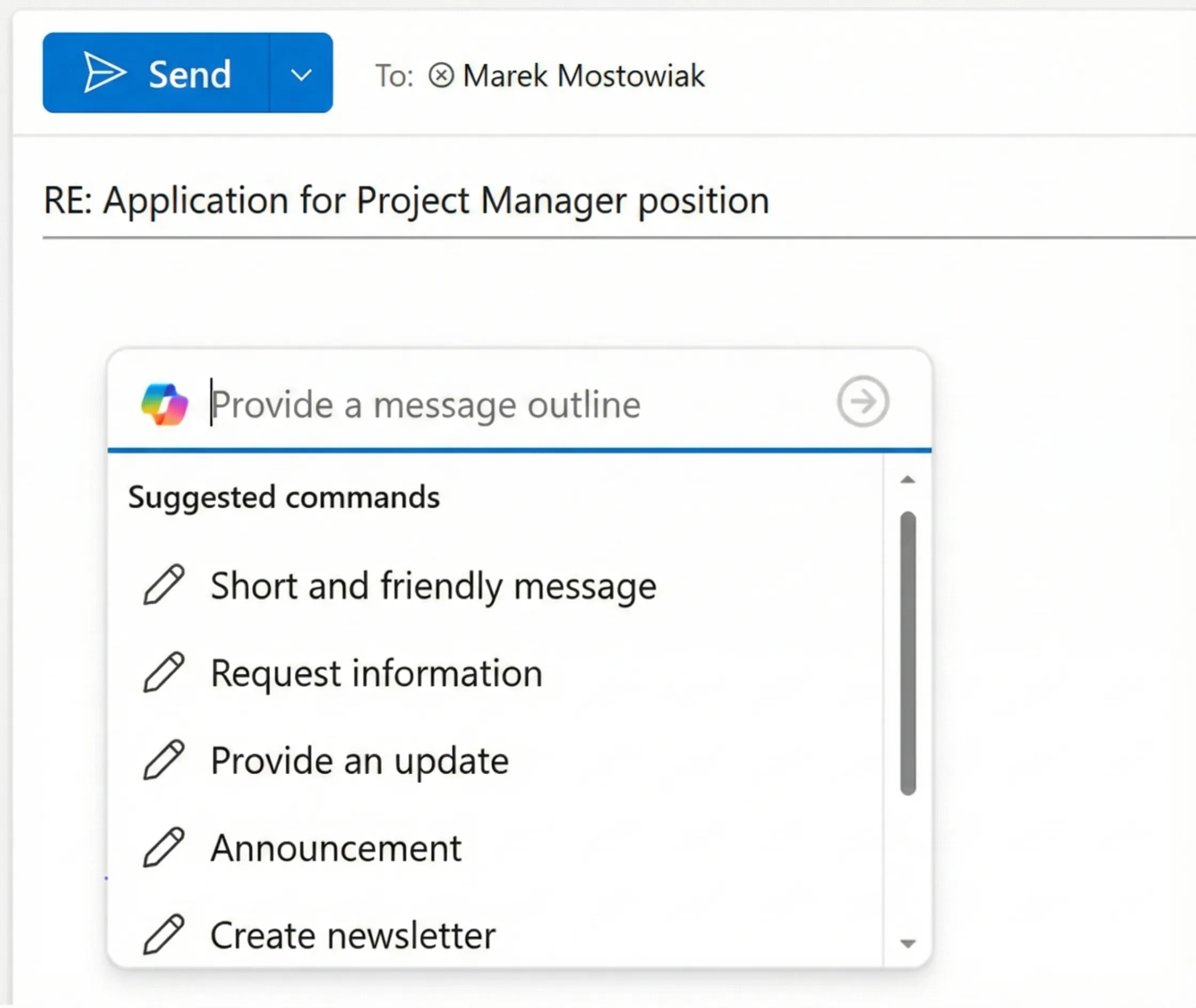
We can enter our own prompt to obtain the full message. For example:
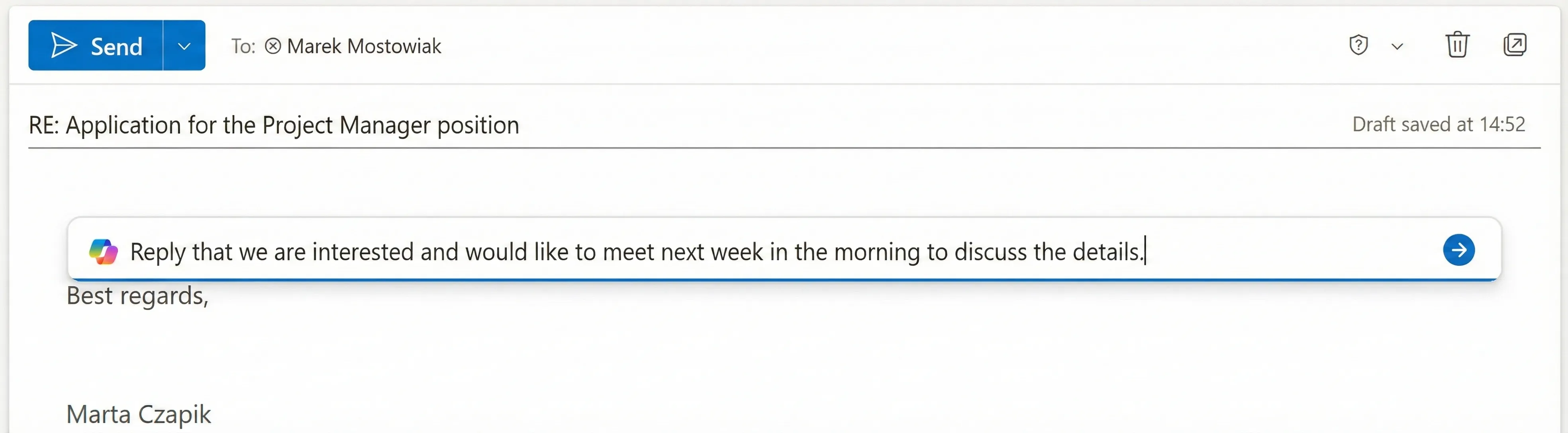
And we will receive a ready answer:
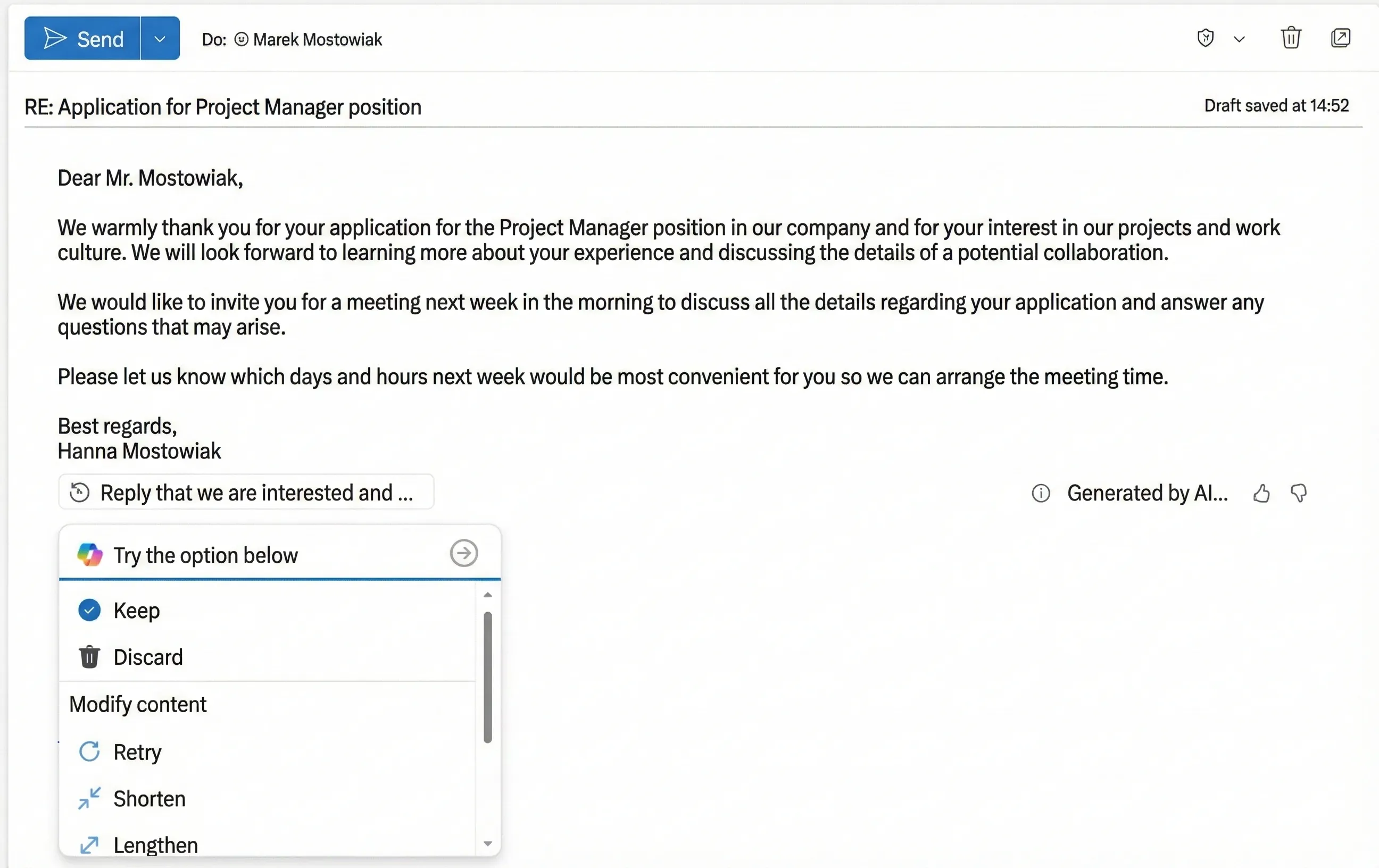
Next, we can accept Copilot's suggestion, reject it, or work on the response further.
We can adjust its tone to the needs of the current situation:
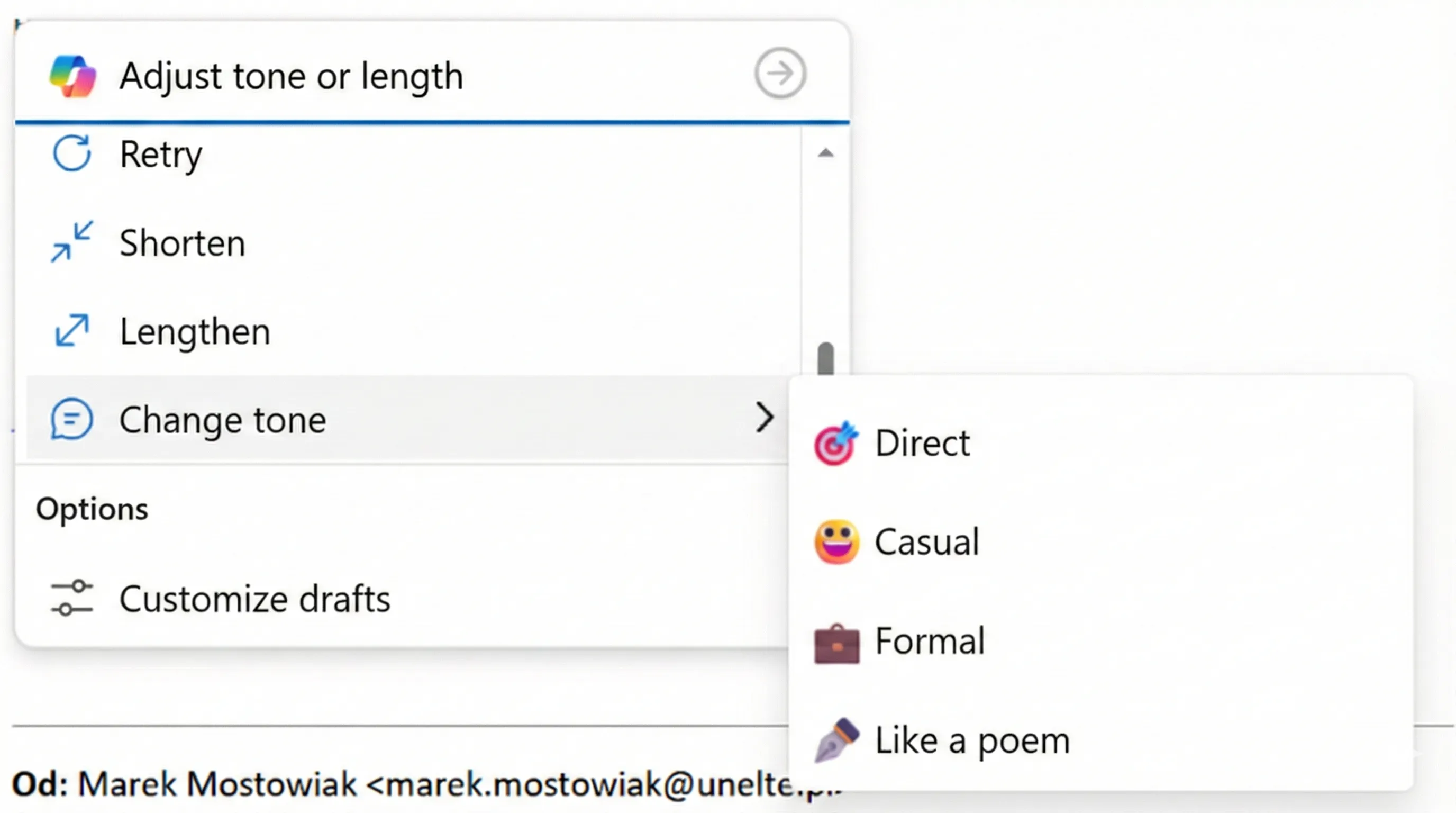
Remember to always carefully read the message before sending it to the candidate, edit it, add what should be included in the response, or change its tone and form.
In this scenario, Copilot may make a mistake, and here we move on to the next example, in which I will tell you more about a situation where I caught Copilot making an error.
2. Creating email summaries
This is a brilliant option when you return after a long absence and a long email correspondence is waiting for you, in which you did not actively participate, but you were added in CC.
The "Summarize" option will allow you to catch up, but here too there is a small asterisk* - I do not encourage you to skip reading the messages 😉 This function will help you determine whether the topic requires an urgent response or whether the problem has already been resolved. However, always familiarize yourself with the content if you want to join the discussion.
Why?
I will share my example with you:
I clicked "Summarize" on a message with Marek's application for the Project Manager position. Below you see the entire message:
.webp)
Copilot summarized this message as follows:
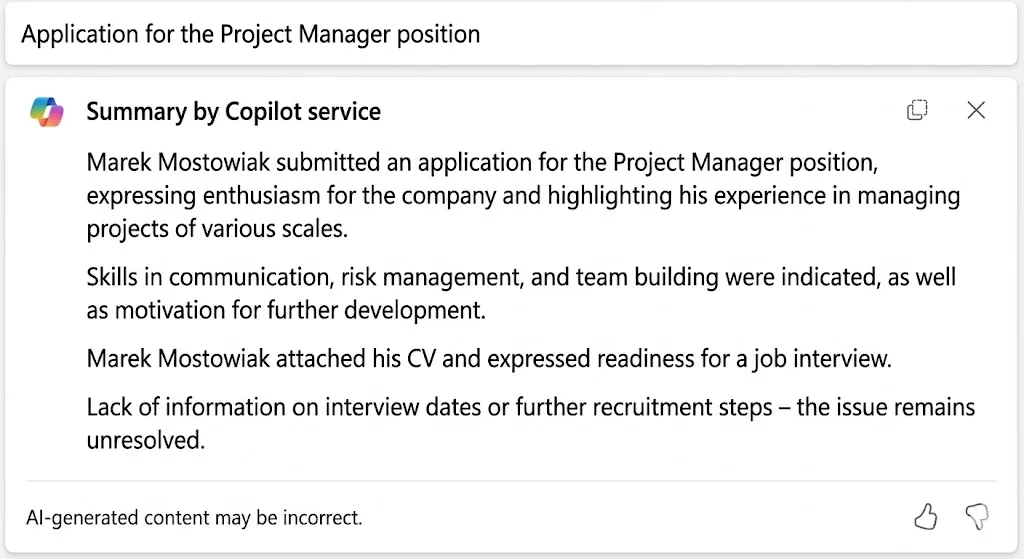
At first glance, everything seems correct, but there's a small problem… Marek didn't attach a CV. Marek wrote "I am sending my CV in the attachment," but he didn't add an attachment with the file.
Therefore, if we relied exclusively on the AI summary, we would make a big mistake by replying to the candidate that we reviewed their CV and want to schedule a meeting to discuss the details. Let's imagine the candidate's surprise 😉
3. Intelligent meeting time search and integration with HR systems
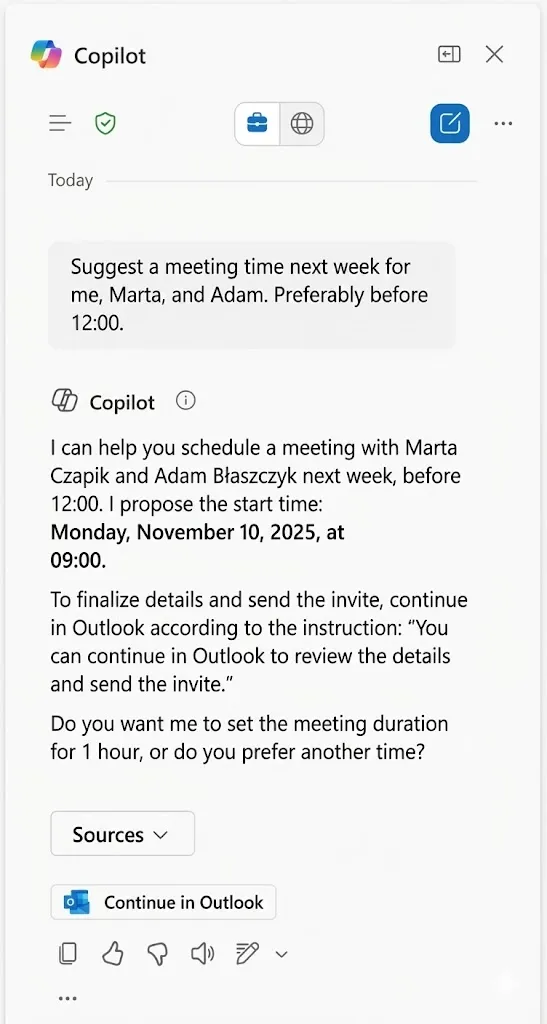
Another practical function of Copilot in Outlook is intelligent search for available meeting times in the calendars of multiple people. It's enough to ask Copilot to find a time that meets all required criteria.
Copilot analyzes availability in participants' calendars, taking into account time zone differences, already scheduled meetings, or preferred working hours. Within a few seconds, it presents proposed times that are most convenient for the entire group.
It's worth mentioning that thanks to HR systems such as Calamari, which offer integration with Microsoft 365, employees requesting leave automatically activate "out of office" status. As a result, when someone asks Copilot for a convenient meeting time, AI will suggest times taking into account the actual absences of team members.
Calamari supports HR teams in managing working time, attendance registration, and handling leave requests, and its integration with Microsoft 365 and Copilot allows seamlessly connecting daily communication with automation of HR processes. Employees can submit leave or absences directly through Teams, and the Calamari system automatically includes this data in schedules. Copilot supports HR in analyzing attendance data and reporting, generating summaries and recommendations based on current statistics. Calamari's integration with Microsoft 365 enables automatic transfer of information between systems, eliminating the need for manual data entry and minimizing the risk of errors. Thanks to this, HR professionals gain more time for strategic activities, and the entire organization works more smoothly and efficiently.
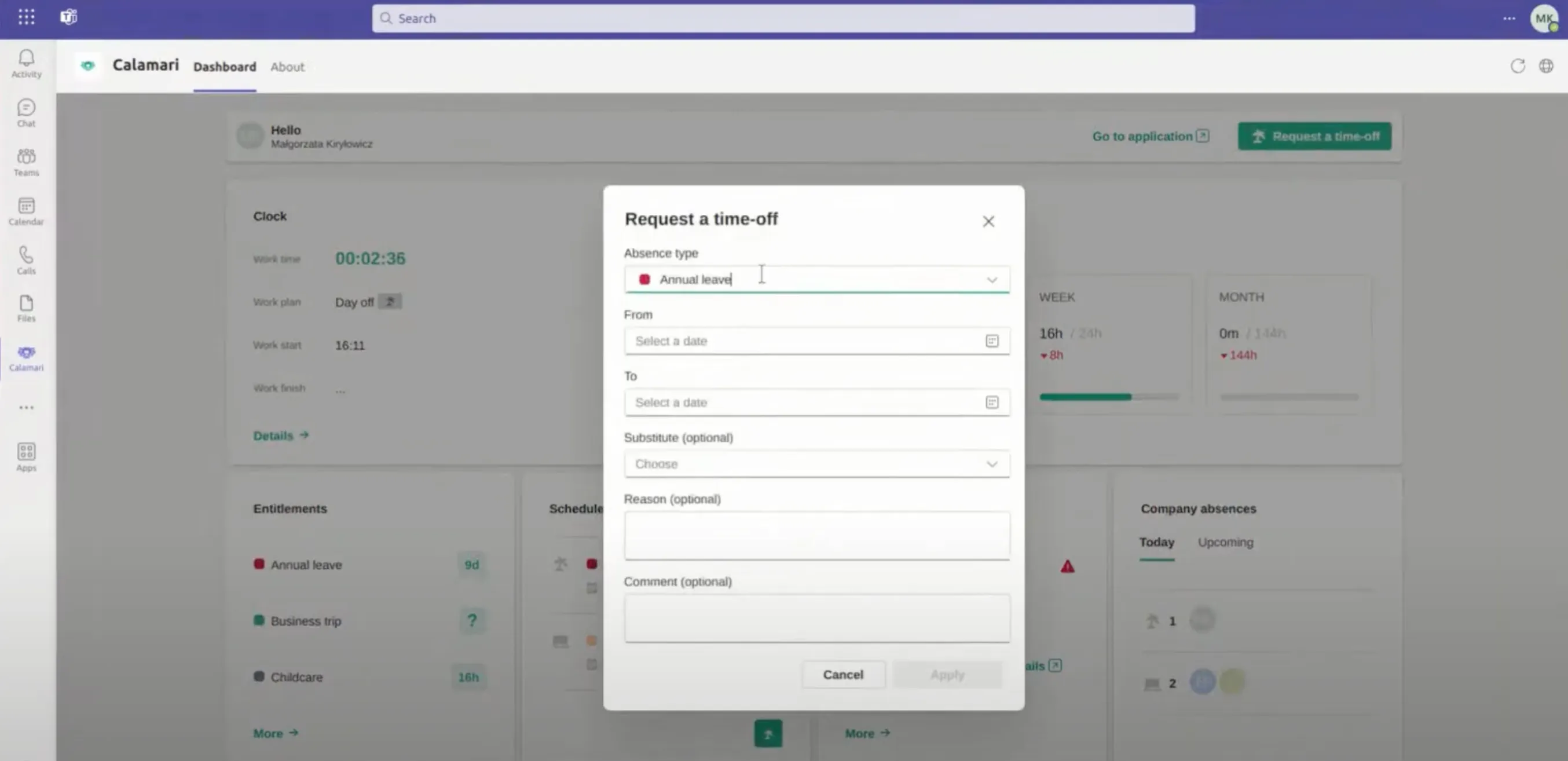
Additionally, Copilot can take into account specific criteria, e.g., meeting length or preferred days of the week, and also automatically send invitations after selecting the appropriate date. Thanks to this, the process of scheduling meetings becomes fast, hassle-free and minimizes the risk of conflicts in schedules.
.webp)
Benefits for HR teams and organizations
- Faster communication – candidates and employees receive answers in real time, which increases their satisfaction and engagement.
- Higher quality and consistency of responses – every message is professional, compliant with guidelines, and error-free.
- Better candidate experience – fast, courteous, and personalized responses build a positive company image.
- Time savings – automation of repetitive tasks allows HR teams to focus on strategic tasks, such as talent development and employer branding.
- Reduced stress and employee burden – AI takes over routine tasks, supporting work-life balance and increasing team motivation.
Summary
The year 2025 is the moment when investment in AI and automation in HR becomes the standard, not a luxury. Copilot in Outlook, supported by integrations with Calamari and Microsoft 365, allows HR teams not only to streamline communication, but also to improve the quality of service for candidates and employees. Companies that use these tools gain an advantage in the battle for talent and build a modern, friendly organizational culture.
Recommendations:
- Test Copilot in Outlook in daily HR work – start with automating responses.
- Use Calamari's integration with Microsoft 365 to streamline time and attendance management.
- Train your team on new solutions – AI is support, not a threat!
FAQ: New dimension of communication during recruitment thanks to Copilot in Outlook
What is Copilot in Outlook and how does it work?
Copilot in Outlook is an artificial intelligence-based tool that supports HR teams, managers, and office workers in everyday communication. It enables automatic generation of professional email responses, summarizing correspondence, and searching for convenient meeting times in multiple people's calendars. Copilot analyzes the content and tone of communication and takes into account the individual needs of the user, helping to maintain consistency and high quality of communication.
What benefits does Copilot in Outlook bring to HR teams?
Shortening response time to candidate and employee inquiries: Automation of repetitive administrative tasks, higher quality and consistency of communication, reduction of risk of errors and inaccuracies in messages, ability to focus on strategic activities such as employer branding and talent development, support for work-life balance by relieving employees of routine tasks, all these elements contribute to increasing the efficiency and satisfaction of the HR team and the entire organization
How does Copilot help in communication with candidates?
Copilot enables quick and personalized responses to candidate messages, automatically incorporating their name, recruitment process stage, and tone consistent with the employer's brand. Thanks to this, every response is courteous, professional, and builds a positive company image. Copilot also allows you to adjust the response style to the situation and edit suggestions before sending, which ensures control over communication.
Are there any limitations or risks of using Copilot?
Despite high effectiveness, Copilot can occasionally make mistakes, e.g., incorrectly summarize a message or fail to notice a missing attachment. It is recommended to always carefully check generated responses and summaries before sending them. AI is a support tool, but should not completely replace human attention and judgment.
In what way does Copilot improve meeting organization?
Copilot analyzes the availability in participants' calendars, takes into account time zone differences, preferences regarding meeting dates and length. In a few seconds, it presents proposals for the best dates for all interested parties and can automatically send invitations after approving the date. Thanks to this, the process of organizing meetings is fast, efficient, and minimizes the risk of conflicts in schedules.
How does the integration of Calamari tools with Microsoft 365 and Copilot look?
Calamari is a system for managing work time, attendance, and leave requests that seamlessly integrates with Microsoft 365 and Copilot. Thanks to this, employees can submit leave requests directly through Teams, and the data is automatically transferred to the Calamari system. Copilot supports HR in analyzing attendance, generating reports and recommendations, eliminating the need for manual data entry and minimizing the risk of errors.
Does implementing AI in HR require special training?
It is recommended that HR teams undergo training in using Copilot and AI tools. This will allow employees to use new features effectively, understand their limitations, and fully leverage the potential of automation. Training also helps dispel concerns related to technology implementation and emphasizes that AI is a support, not a threat to the team.
What are the recommendations for companies starting work with Copilot?
Test Copilot in everyday HR work, starting with automating responses. Use Calamari's integration with Microsoft 365 to optimize time and attendance management and leave management. Train the team on operating new tools and artificial intelligence capabilities. Regularly monitor the effects of AI implementation and adjust processes to the changing needs of the organization. Companies that decide to implement AI in HR gain a competitive advantage, better image, and greater organizational efficiency.